A creative handoff is ready when the recipient can find the approved export, match it to a placement, and use the right accompanying copy and URL without asking the designer. Start with the agreed deliverable list and the approved revisions. Package only files cleared for this delivery; keep pending work visible in a separate list.
Package files with a predictable naming structure
Use the team's filename pattern. For example, spring-launch_prospecting_9x16-story_en-us_v03.mp4 identifies a campaign, audience, placement, locale, and revision. Pair it with its approval record; a filename alone cannot prove clearance.
Compare filenames with the actual files. A square export accidentally named 9x16-story is still the wrong deliverable.
Separate working sources from final exports
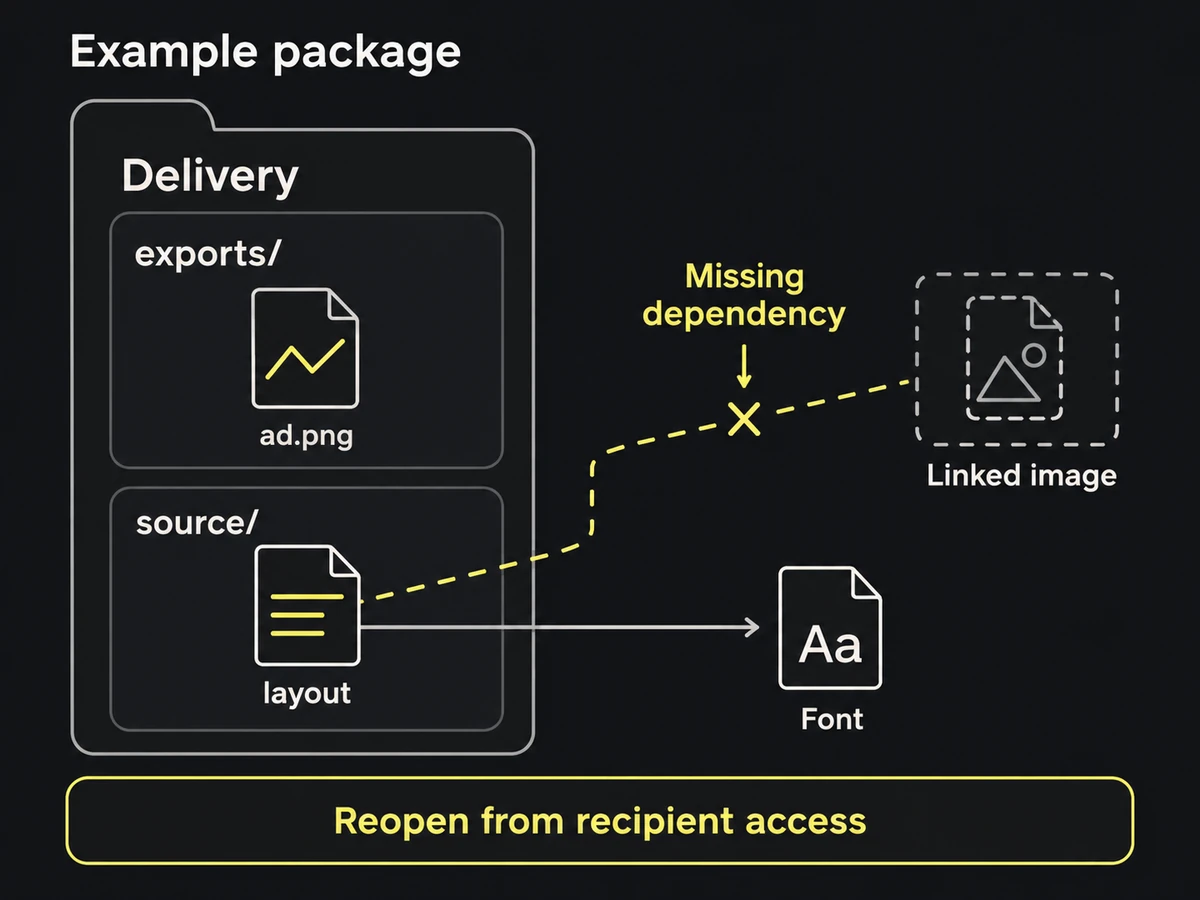
Keep the recipient's upload files in exports/, in the file types specified for their destinations. Put editable files or project links in source/. Include a short delivery list at the package root.
If editable work is part of the handoff, reopen it from the delivered copy. Check linked images, fonts, and access to shared libraries. Package dependencies you can redistribute; otherwise name them and explain how the recipient can obtain access. An inaccessible project link is a missing source, even when your own account opens it.
Build a per-file manifest with known exclusions
One row per export is enough for a small package:
| Export | Intended use | Approval | Copy and destination |
|---|---|---|---|
spring-launch_prospecting_9x16-story_en-us_v03.mp4 | English story placement named in media plan | Link to sign-off on v03 | Copy row EN-02; destination row LP-01 |
This is an illustrative row; replace every reference with one the recipient can open. Add restrictions beside the affected file, such as a territory or permitted channel. List missing variants separately with an owner and delivery date. Do not leave an unapproved substitute in exports/.
For packages that need source relationships and revision history, use a creative asset manifest rather than maintaining a second delivery spreadsheet.
Document copy, disclaimers, and destination links
Include exact text to enter outside the artwork: headline, body, button label, and any placement-specific text. Reference the approved copy revision so a later edit does not silently change the delivery.
Open the destination URLs with the agreed tracking parameters. Check the page's product, offer, language, and availability against the ad. Compare required footnotes with the rendered exports, not only the design file.
Assign a single recipient check owner
Ask one receiving person to check the package from their own access:
- Open each delivery file; play video through the final frame and check audio when present.
- Compare file type, dimensions, duration, and size with the destination's supplied requirements.
- Inspect required text and crops at the intended viewing size, with the placement overlay reference.
- Follow the copy, approval, source, and destination links.
- Reconcile the files received with the agreed delivery list.
Record the accepted batch and any missing items. If the recipient cannot identify the right revision or open a required dependency, the handoff is still open. Fix that gap before calling the package delivered.