Use this checklist when the brief is agreed but the source folder still needs checking. The result should be a list of usable inputs, missing replacements, and the deliverables each gap blocks. A file counts as received when you can open it; it counts as ready when it can do the assigned job.
Define the deliverables before requesting files
Take the deliverable list from the brief. For each placement and locale, identify the copy revision, image or screen capture, brand mark, and destination it needs. Link shared inputs once and name all their consumers.
Here is a fictional intake list for a feed-and-story campaign:
| Input | Used by | Check result | Next action |
|---|---|---|---|
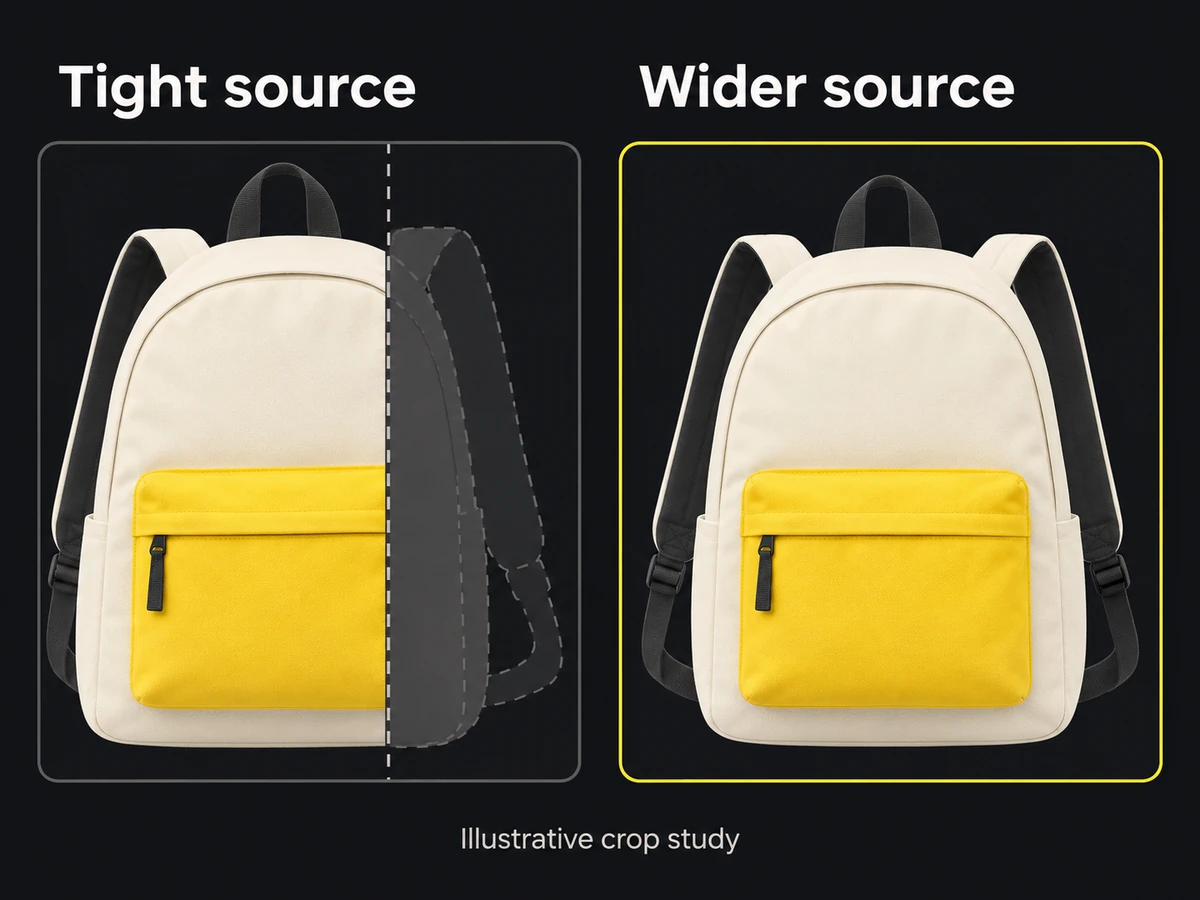
| Product photo 01 | Feed and story | Original is sharp; story crop cuts off the product | Photographer supplies a wider original |
| Light logo SVG | Both dark layouts | Opens correctly; clear-space guide supplied | Ready |
| English copy revision 3 | Both exports | Headline approved; offer expiry unresolved | Offer owner confirms expiry before layout review |
| Live landing URL | Both placements | Opens an expired offer | Campaign owner supplies the correct page |
Replace these rows with links to your files. Keep a check result specific enough that the next person can repeat it.
Audit crop margins, retouching rights, and format integrity
Open originals rather than judging folder thumbnails:
- Place each required crop over the image. Check the complete product, face, or interface feature that carries the message; spare background alone does not rescue a clipped subject.
- Compare available source pixels with the size the image will occupy in the final layout. Inspect the crop at that size for softness; use the resolution guide if the calculation is unclear.
- Put the logo on the intended light or dark background. Look for a baked-in matte, missing transparency, or the wrong color variant. Request the approved vector when available; a sufficiently large transparent raster may still suit a fixed-size output.
- Confirm the capture shows the current product state and contains no private data, selection handles, or development overlays.
- Record the permitted campaign use and edits beside the source: crop, retouch, recolor, or background removal. Link the permission record or name the person who can resolve it.
Label assets as required, optional, or backup
Mark the elements the message depends on as required. Mark accents the designer may omit as optional. A backup must solve a named problem: an alternate photo with the whole product visible in the story crop, for example. Five similar tight crops are not five useful backups.
Track file status: received, approved, or replaced
Use requested, received, ready for production, and replaced. Keep input readiness separate from approval of the eventual ad. A usable logo does not make a layout approved.
When replacing an input, record its replacement and tell the designer which in-progress layouts used it. Retain the old file in history, outside the active source selection. Correct offer wording in the copy record first, then identify the layouts that need updating.
Assign missing assets an owner and due date
Add an owner and due date to each failed check. State the consequence: “story layout blocked; feed concept may proceed” is more useful than “photo pending.”
Finish by walking the deliverable list, not the folder. Every required input must resolve to a ready source or an explicitly accepted limitation. Send the designer that list and the open blockers. Export packaging belongs to the later handoff.